Desktop tools · 2 min read
Cat Keyboard
A cat crossing the keyboard is a small problem with an awkward implementation detail: the application receiving the keys may be any ordinary desktop program. I built a native Windows guard with manual locking, optional key-cluster detection, and several ways to unlock.
- My role
- Personal project
- Project scope
- Windows utility · private source
 Open full image in a new tab
The main responsibilities in this workflow.
- Windows key events
- Guard state and timeout
- Suppress or pass through
- Mouse / tray / emergency unlock
Recovery is part of the feature
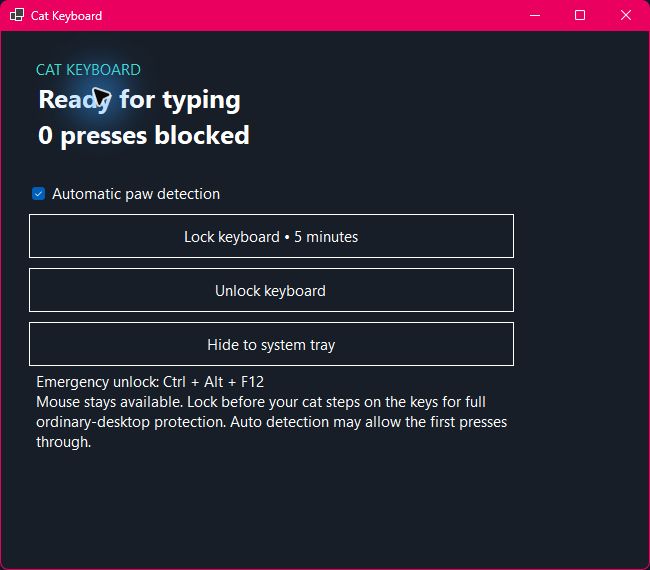
The guard can suppress keyboard input while leaving the mouse usable. A dashboard button, tray controls, an emergency Ctrl+Alt+F12 combination, and a timeout provide ways out. Closing the application releases the hook.
Manual locking lasts five minutes. That gives the user a predictable prevention mode without making protection indefinite. Recovery is not a secondary settings screen; it is part of the behavior that makes input interception usable.
Match key-down and key-up behavior
The state machine tracks held and suppressed keys. A key that reached the focused application must still be able to release correctly, while a swallowed key should not later leak a mismatched event. This is especially relevant to modifiers and shortcuts.
A low-level Windows hook connects that state to desktop input. The callback performs bounded state work, with rendering handled separately. Pure guard checks can exercise transitions without requiring a live keyboard hook.
Automatic detection is deliberately limited
The optional heuristic looks for four distinct non-modifier keys held within 120 milliseconds and applies a short lock. Repeated keys and ordinary modifier combinations are excluded. It does not identify an animal: the first keys can reach the application, and slow or single-key input can evade it.
I also explored camera-based detection in a browser using TensorFlow.js. That experiment can protect only its own page. The native utility solves a different problem and does not depend on a camera or cloud service.
Why this approach stays small
The design notes compare manual locking, key-cluster detection, input buffering/replay, camera recognition, and device-level blocking. Buffering would introduce typing delay and complicated replay behavior; a driver would add installation and recovery responsibilities.
The chosen utility keeps no typing log and does not decode text. It targets ordinary Windows applications, with secure desktops, elevated programs, and direct device readers outside its guarantee. A startup smoke check is not proof of interception in every application; physical acceptance checks remain relevant.
Project notes
Not offered here as a public download. Input interception has platform boundaries; automatic mode is a heuristic, not cat recognition.